
Itron 100G Datalogging Gas Endpoint Installation Guide

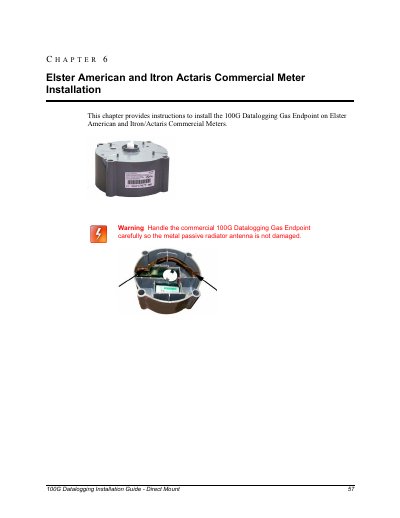
This chapter provides instructions to install the 100G Datalogging Gas Endpoint on Elster American and Itron/Actaris Commercial Meters

Itron 100G Datalogging Gas Endpoint Installation Guide - cover page
Brand
iTRON
Category
Other
Document type
Installation Guide
Language
English
Pages
41
File format
PDF
File size
1.1 MB
Published
19 October, 2023
Updated
19 October, 2023
MD5 checksum
3FAF9E9B30FB7D52E1845DB31356347D

About this manual

This guide provides instructions for installing the Itron 100G Datalogging Gas Endpoint on Elster American and Itron/Actaris commercial meters. It covers the removal of the index assembly, programming the endpoint using an FC200SR handheld computer, and attaching the endpoint to the meter.

What's inside

  • Elster American and Itron Actaris Commercial Meter Installation
  • Removing the Index/ Index Assembly from the Meter
  • Programming the 100G Datalogging Commercial Gas Endpoint
  • To Attach the 100G Datalogging Commercial Gas Endpoint to the Elster American Commercial Meter
  • To Attach the Index/Cover Assembly on the Elster American Commercial Meter
  • Dresser ROOTS Commercial Rotary Meter Installation
  • Installing the 100G Data logging Commercial Gas Endpoint on a Dresser ROOTS Rotary Meter

Specifications

Programming Software VersionEndPoint-Link or Point-Link Pro version 5.3 or later
Mounting Screw Torque72 inch-pounds
Index Drive Rate Options5, 10, or 100 cubic feet

Frequently asked questions

What software is required to program the 100G Datalogging Gas Endpoint?

The endpoint must be programmed with the FC200SR handheld computer loaded with EndPoint-Link or Point-Link Pro software version 5.3 or later.

What software version is required to program the 100G Datalogging Gas Endpoint?

Programming requires the FC200SR handheld computer loaded with EndPoint-Link or Point-Link Pro software version 5.3 or later.

What is the maximum torque setting for tightening the mounting screws?

If a torque driver is available, the mounting screws must be tightened to 72 inch-pounds.

What is the maximum distance allowed between the FC200SR and the endpoint during programming?

For best success, the FC200SR must be kept within 6 feet of the target endpoint.

Download PDF (1.1 MB)

More iTRON Manuals


View all iTRON manuals →