
Step‑by‑step instructions for installing and configuring the A2C‑WIFI Wi‑Fi module on a Hunter ACC2 controller.
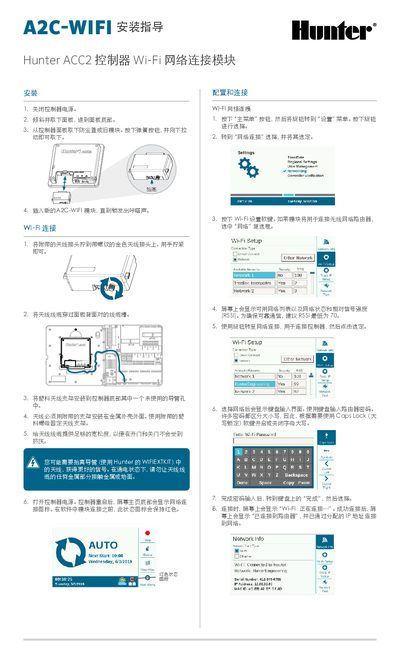
This guide walks you through the physical installation of the A2C‑WIFI module, including power‑off, panel removal, antenna mounting, and securing the new module. After installation, the controller is powered on and the Wi‑Fi status icon indicates connection readiness.
The document then details Wi‑Fi network configuration, software setup, direct‑connect mode, and troubleshooting tools such as the network test function. Regulatory compliance information for EU and FCC standards is also provided. This manual is written in Chinese.
| Minimum RSSI for reliable communication | 70 |
|---|---|
| Antenna mounting requirement | Mounted on metal housing exterior with supplied plastic nut |
| FCC compliance | Class B digital device, Part 15 limits |
Turn off the controller, remove the panel, take out the old module, then insert the new A2C‑WIFI module until you hear a click.
Open the Settings menu, select Network Connection, press the Wi‑Fi setup soft key, choose a network from the list, and enter the router password.
In the Settings menu, select Network Connection, press the Wi‑Fi setup soft key, and check the “Direct Connection” box.
Run the Network Test function, which checks the connections from the controller through the router to the server, and restart the controller if needed.