
Installation and setup guide for the Grandstream GWN7630LR outdoor wireless access point, covering hardware mounting and initial configuration.
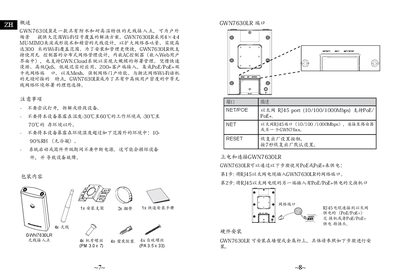
This document provides installation instructions for the Grandstream GWN7630LR, a waterproof and high-temperature resistant wireless access point designed for outdoor environments. It details how to power the device using PoE/PoE+ and includes steps for wall or pole mounting.
The guide explains how to connect to the default Wi-Fi network broadcast by the unit upon startup. Users can access the configuration interface via a browser using the MAC address or the GWNDiscoveryTool utility. It also notes that the device supports standalone management, embedded AC controller functionality, and integration with the GWN.Cloud system. This manual is written in Chinese.
The device provides a Wi-Fi coverage range of up to 300 meters.
You must press the RESET button for 7 seconds to restore factory default settings.
The device should not be exposed to working environments outside the temperature range of -30°C to 60°C.