
French quick start guide for the Gram K3R electronic scale, covering unpacking, screen display, button functions, and connections.
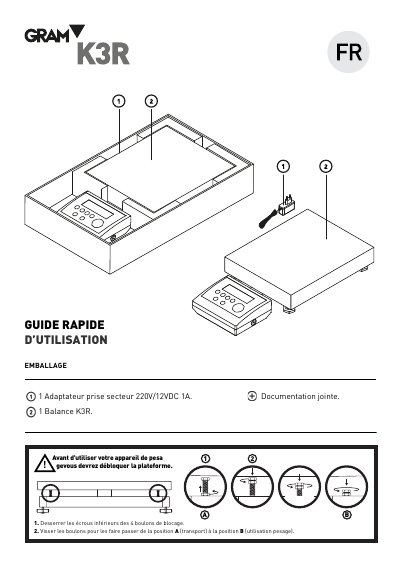
This is the French quick start guide for the Gram K3R electronic scale. It explains how to unpack the scale, move it from transport to weighing position, and get started with basic operation.
The guide describes the screen elements and indicators, the functions of each button, and the load cell and RS-232 connector pinouts. It also points to the full manual available from Gram Precision. This manual is written in French.
| Power adapter | 220V/12VDC 1A |
|---|---|
| Load cell connector | Male chassis socket P700 (7-pins) |
| RS-232 connector | Male chassis socket P700 (8-pines) |
Loosen the lower nuts of the four locking bolts and screw the bolts from position A (transport) to position B (weighing).
It means there is a weight on the scale and the weight is not changing.
Press the On/Off button to connect the indicator.
Hold the PLU button for more than one second to enter factory mode, which requires a password.