
Programming guide for Frymaster fryer computers covering temperature, sensitivity, cooking time, and hold settings for full and split pots.
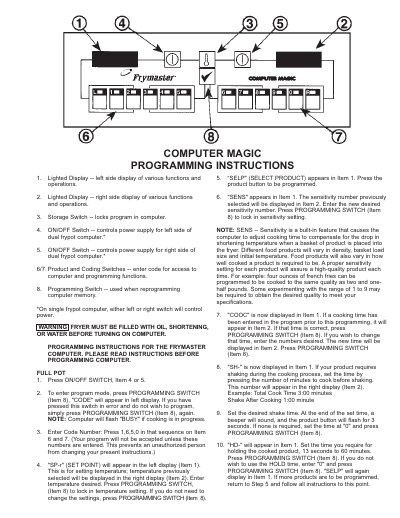
This document provides step-by-step programming instructions for the Frymaster computer system used in commercial deep fryers. It details how to access the programming mode using a specific code sequence (1-6-5-0) to configure various operational parameters.
The guide covers settings for both full pot and split pot configurations, including Set Point temperature, product selection, sensitivity adjustments, cooking time, shake timers, and hold times. Additional sections explain special features such as the Boil feature, Fryer Recovery Time Check, and toggling between Fahrenheit and Celsius display modes.
| Access Code (Full Pot) | 1,6,5,0 |
|---|---|
| Access Code (Boil Feature) | 1,6,5,3 |
| Access Code (Recovery Time) | 1,6,5,2 |
| Boil Temperature Setting | 195°F (91°C) |
| Hold Time Range | 13 seconds to 60 minutes |
The user must press the sequence 1, 6, 5, 0 in that order on the product and coding switches.
Press the ON/OFF switch, then press the Programming Switch, enter code 1-6-5-3, and the temperature will automatically set to 195°F.
Yes, any product button can be programmed to use the same hold time normally assigned to a different product by pressing the address number.