
Operating instructions for the Frymaster Computer Magic III fryer, covering controls, programming, cooking cycles, temperature checks, and troubleshooting.
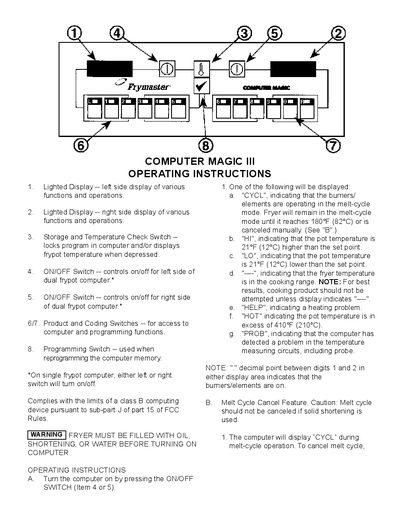
This manual explains the functions of the dual‑pot Computer Magic III fryer, including the left and right lighted displays, ON/OFF switches, programming switches, and temperature check switch. It describes how to turn the computer on, interpret display codes such as CYCL, HI, LO, HOT, and PROB, and how to use melt‑cycle and cook‑cycle features.
The guide also details temperature‑checking procedures, alarm indications, shake‑time alerts, and steps for resetting the unit if a fault occurs. Safety warnings and FCC compliance notes are included at the end of the document.
| Melt‑cycle target temperature | 180 °F (82 °C) |
|---|---|
| High temperature alarm threshold | >410 °F (210 °C) |
| Temperature deviation indicators | ±21 °F (±12 °C) from set point |
| Low temperature deviation indicator | −21 °F (−12 °C) from set point |
Press the ON/OFF switch (Item 4 or 5) to power the unit.
It indicates that the pot temperature has exceeded 410 °F (210 °C).