
The Exar PCIe-800i RS-422/485 Serial Card manual provides specifications, pin‑outs, wiring, configuration, driver installation and troubleshooting.
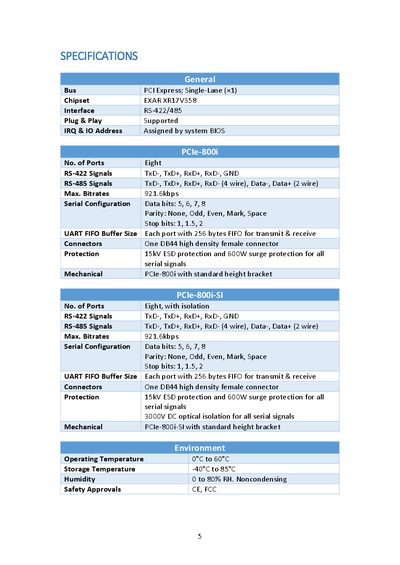
The PCIe‑800i is an 8‑port RS‑422/485 serial I/O card that plugs into a single‑lane PCI Express slot. It supports both RS‑422 full‑duplex and RS‑485 full‑ or half‑duplex modes, with optional 3000 V DC optical isolation on the -SI version. The card includes a DB44 high‑density connector, 256‑byte FIFO per port, and 15 kV ESD protection.
The manual details hardware settings such as DIP‑switch mode selection, jumper‑controlled termination resistors, and automatic direction control for RS‑485. It also walks through driver installation on Windows, wiring recommendations, and how to uninstall the drivers when needed.
| Bus Interface | PCI Express Single‑Lane (×1) |
|---|---|
| Chipset | EXAR XR17V358 |
| Number of Ports | Eight |
| Maximum Bitrate | 921.6 kbps |
| UART FIFO Buffer Size per Port | 256 bytes |
Short pins 1 and 3 of the corresponding JP header (JP1‑JP8) to enable the TX termination resistors.