
Quick start guide for the Emerson E510 NEMA 4/12 drive covering wiring, keypad navigation, parameter changes, external start/stop and potentiometer setup.
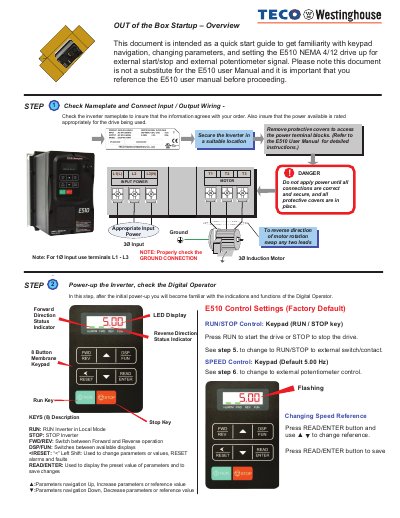
This quick start guide introduces the Emerson E510 NEMA 4/12 drive out of the box. It walks through checking the inverter nameplate against the order, confirming the available power is rated appropriately for the drive, securing the inverter in a suitable location, and connecting input and output wiring to the power terminal blocks. A danger note warns that power must not be applied until all connections are correct and secure and all protective covers are in place.
The guide then explains powering up the inverter and reading the digital operator: the LED display, run and stop keys, forward and reverse status indicators, and the eight-button membrane keypad with RUN, STOP, FWD/REV, DSP/FUN,
| Drive series/model | E510 NEMA 4/12 drive |
|---|---|
| Default RUN/STOP control | Keypad (RUN / STOP key) |
| Default speed control | Keypad, default 5.00 Hz |
| Keypad buttons | 8 |
| Input power terminals | L1(L), L2, L3(N); for 1Ø input use terminals L1 - L3 |
| Motor output terminals | T1, T2, T3 |
Swap any two of the motor leads.
Press the READ/ENTER button and use the ▲ key to change the reference, then press READ/ENTER to save it.
RUN/STOP control is set to the keypad (RUN / STOP key) and speed control is set to the keypad with a default of 5.00 Hz.
No. Power must not be applied until all connections are correct and secure and all protective covers are in place.