
EliteScreens Aeon Series EDGE FREE Frame Projection Screen User Manual

This manual provides assembly, installation, and usage instructions for the EliteScreens Aeon Series EDGE FREE frame projection screen.
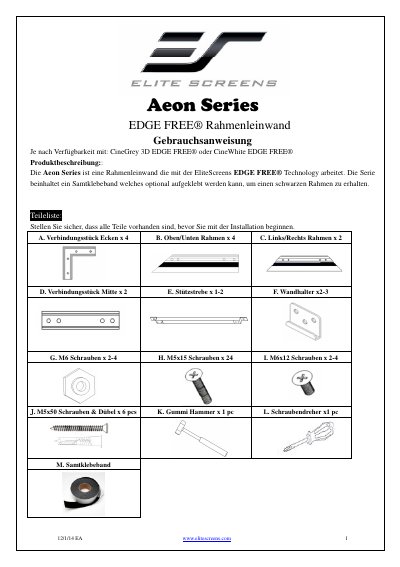

EliteScreens Aeon Series EDGE FREE Frame Projection Screen User Manual - cover page
Brand
Elite Screens
Category
Other Electronics
Document type
User Manual
Language
German
Pages
12
File format
PDF
File size
3.1 MB
Published
13 November, 2026
Updated
13 November, 2026
MD5 checksum
28E896840B11AFF35FE4817E9F19121D

About this manual

The document serves as a user guide for the EliteScreens Aeon Series EDGE FREE frame projection screen. It details the contents of the package, including the frame components, mounting hardware, and optional velvet adhesive tape. The guide provides step-by-step instructions for assembling the frame structure and attaching the screen material. This manual is written in German.

What's inside

  • Product Description
  • Parts List
  • Assembly
  • Installation
  • Velvet Frame Application
  • Mounting Hardware

Frequently asked questions

What is the Aeon Series EDGE FREE projection screen designed to do?

It is a frame screen that operates with EliteScreens EDGE FREE Technology.

What material is required to achieve the best result with the CineGrey 3D ALR screen?

The screen must be installed using the "Angular Reflective ALR (Ambient Light Rejecting)" fabric.

How far from the outside of the frame should you measure when applying the velvet tape?

You must measure 10mm (0.40") from the outside of the frame.

Download PDF (3.1 MB)

More Elite Screens Manuals


View all Elite Screens manuals →