
Key facts
- Manuals
- 1
- Languages
- EN
- Last added
- 2023-10-19
Featured Elite Screens manuals
Elite Screens Manual Tab-Tension 2 Series Tensioned Manual Pull-Down Projector Screen User’s Guide
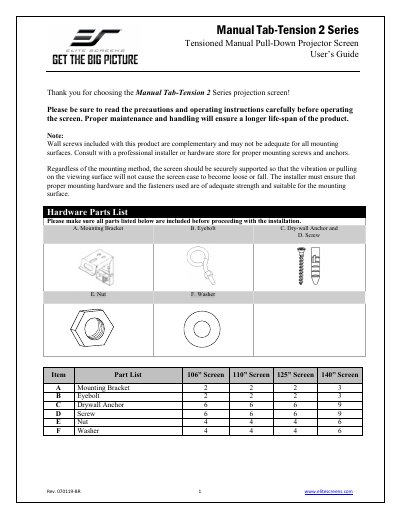
This user guide provides step-by-step instructions for installing the Manual Tab-Tension 2 Series projector screen on flush walls, ceilings, or suspended ceilings. It includes hardware parts lists for different screen sizes (106" to 140").
The guide also explains how to operate the screen, including pulling it down at a 90-degree angle, using the slow retract mechanism, and adjusting screen tension with a 4mm Allen wrench (though factory settings are recommended). Safety notes warn against damaging the screen material or voiding the warranty through improper handling.
Covers: Installation Instructions · Hardware Parts List · Screen Operation · Tension Adjustment · Safety Notes
Latest Elite Screens manuals
Elite Screens Manual Tab-Tension 2 Series Tensioned Manual Pull-Down Projector Screen User’s Guide
User Manual 5 pages · 323 KB · ENUser guide for Elite Screens' Manual Tab-Tension 2 Series projector screen, covering installation, operation, and maintenance instructions.
Which document do I need?
User Manual
Day-to-day operation, settings and troubleshooting. Start here if the product is already set up.
Questions answered in Elite Screens manuals
How do I install the screen on a flush wall?
Mark screw locations, drill holes, insert drywall anchors, mount the bracket with screws, then attach the screen to the bracket.
From: Elite Screens Manual Tab-Tension 2 Series Tensioned Manual Pull-Down Projector Screen User’s Guide
How do I retract the screen?
Pull the screen down more than 2 inches, then release it gently to retract. The screen has a slow retract mechanism that allows it to retract without holding the handle.
From: Elite Screens Manual Tab-Tension 2 Series Tensioned Manual Pull-Down Projector Screen User’s Guide