
This quick reference guide provides instructions for making calls, starting video meetings, sharing content, and transferring calls on the Cisco Webex Room…
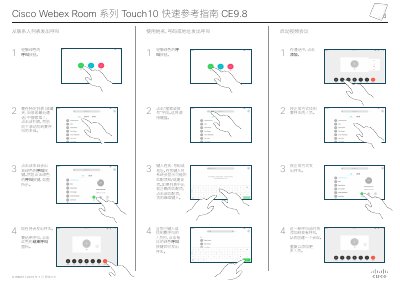
This document serves as a quick reference guide for the Cisco Webex Room Series Touch10. It covers essential operations such as initiating calls from contact lists or by dialing numbers directly into the system.
The guide also details procedures for starting video meetings, sharing content locally and with remote participants, and managing call functions like transferring and forwarding. This manual is written in Chinese.
Click the 'Search or Dial' field to open the keyboard, type the name or number, and click the green Call button.
During the call, click Add. Find and call the new person using normal methods to create a conference.
Click Call in Progress Share. Ensure the input source is connected and on before sharing.