
Cisco VoIP 7945 Phone Guide

Cisco VoIP 7945 Phone Guide covering phone buttons, call handling, voicemail, directories, and password policy.
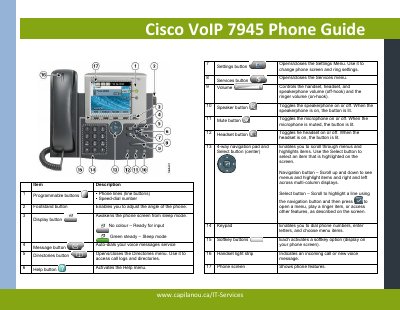

Cisco VoIP 7945 Phone Guide - cover page
Brand
Cisco
Category
Telephone
Document type
User Manual
Language
English
Pages
2
File format
PDF
File size
356 KB
Published
14 November, 2026
Updated
14 November, 2026
Model
7945
MD5 checksum
9C84519634E693D0836FDF7512539A65

About this manual

This guide describes the buttons and controls on the Cisco VoIP 7945 phone and explains common call tasks such as placing calls on hold, call waiting, call forwarding, transfer, and conference calls.

It also covers accessing directories, using voicemail, and the password policy for voicemail PINs.

What's inside

  • Item Description
  • Placing a Call on Hold
  • Call Waiting
  • Call Forwarding
  • Call Forwarding to Voicemail
  • Call Transfer
  • Conference Call
  • Accessing the Directories
  • Voicemail
  • Password Policy

Frequently asked questions

How do I place a call on hold?

Press the hold softkey during a call, then press the resume softkey to remove the call from hold.

How do I forward calls?

Press the CFwdALL softkey and enter the destination number; pressing CFwdALL again removes the forward.

What is the default voicemail password?

The default password is 1478963.

What are the voicemail password requirements?

The password should be at least 4 numbers and cannot be 1234 or all the same number.

Download PDF (356 KB)

More Cisco Manuals


View all Cisco manuals →