
Cisco 2960 Switch VLAN Configuration Lab Guide

CCNA Discovery lab guide for creating VLANs and assigning ports on a Cisco 2960 switch, including IOS commands and connectivity checks.

Cisco 2960 Switch VLAN Configuration Lab Guide - cover page
Brand
Cisco
Category
Network Switches
Document type
Other
Language
Chinese
Pages
4
File format
PDF
File size
102 KB
Published
15 November, 2026
Updated
15 November, 2026
Model
2960
MD5 checksum
592D2678DDFBC6B2E3685C45316C426D

About this manual

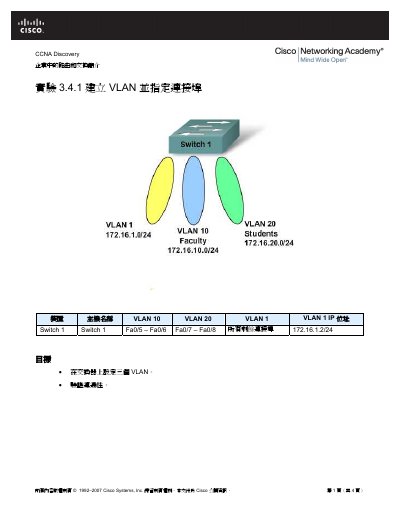
CCNA Discovery lab 3.4.1 guides students through creating VLANs on a Cisco 2960 switch and assigning switch ports. It lists required devices, PC IP settings, and IOS commands for VLAN 10 (Faculty) and VLAN 20 (Students).

The steps include connecting PCs, configuring Switch1 with IP address 172.16.1.2/24, assigning Fa0/5 and Fa0/6 to VLAN 10 and Fa0/7 and Fa0/8 to VLAN 20, then verifying connectivity with ping and show vlan commands. This manual is written in Chinese.

What's inside

  • Objectives
  • Devices
  • Background and Preparation
  • Step 1: Connect the Equipment
  • Step 2: Perform Basic PC Configuration
  • Step 3: Configure Switch 1
  • Step 4: Verify Connectivity
  • Step 5: Reflection

Frequently asked questions

What name is assigned to VLAN 10?

VLAN 10 is named Faculty.

What name is assigned to VLAN 20?

VLAN 20 is named Students.

Which ports are assigned to VLAN 10?

Switch ports Fa0/5 and Fa0/6 are assigned to VLAN 10.

What IP address is configured for Switch1 VLAN 1?

Switch1 VLAN 1 uses IP address 172.16.1.2/24.

Download PDF (102 KB)

More Cisco Manuals


View all Cisco manuals →