
Belkin INC006 Thunderbolt 4 HDMI dock quick installation guide listing single, dual and triple monitor resolutions for Windows and macOS.
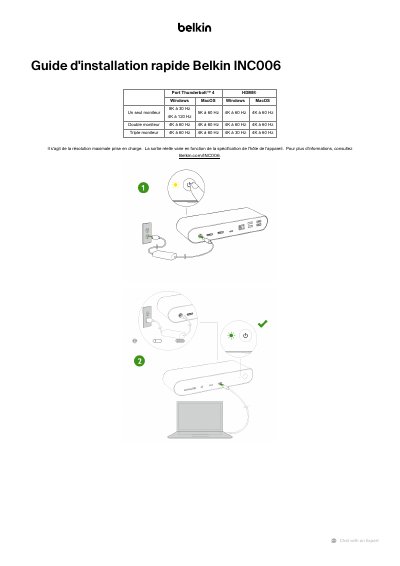
This is the French quick installation guide (Guide d'installation rapide) for the Belkin INC006, a Thunderbolt 4 HDMI dock used with Windows and macOS computers. It presents the display configurations the dock supports: a single monitor, dual monitors and triple monitors, with the resolution and refresh rate listed for each case.
The guide notes that the listed resolutions are the maximum supported and that actual output varies depending on the specification of the host device. It directs readers to Belkin.com/INC006 for more information and includes standard Belkin support and product-registration links. This manual is written in French.
| Connection type | Thunderbolt 4, HDMI |
|---|---|
| Highest listed single-monitor resolution | 8K at 30 Hz |
| Highest listed refresh rate | 4K at 120 Hz |
| Monitor configurations | Single, dual or triple monitor |
| Operating systems | Windows and macOS |
The guide lists up to 8K at 30 Hz for a single monitor, along with other listed rates such as 4K at 120 Hz and 5K at 60 Hz.
No. The listed value is the maximum supported resolution, and actual output varies depending on the host device specification.
The guide shows single monitor, dual monitor and triple monitor configurations.
Belkin refers readers to its product page at Belkin.com/INC006.