
This guide explains how to wire, power, bind, and verify communication for Wireless Q45 Sensor networks using the DX80G2M6-QC Gateway.
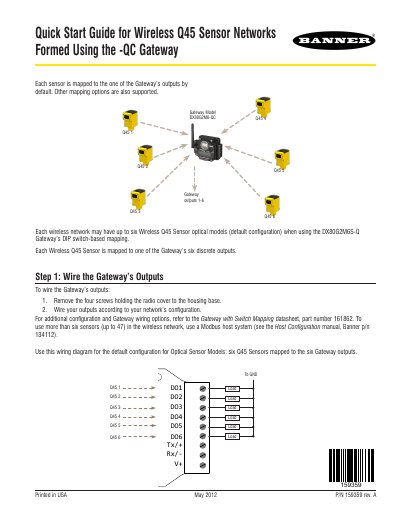
This document serves as a quick start guide for setting up Wireless Q45 Sensor networks using the DX80G2M6-QC Gateway. It details the initial steps for wiring the Gateway's outputs and applying power to the device, including specific wiring diagrams for optical sensor models. The guide also covers the procedure for binding Wireless Q45 Sensors to the Gateway to ensure they only exchange data with the correct unit.
| Max Sensors per Network | up to six Wireless Q45 Sensor optical models |
|---|---|
| Gateway Power Input | +10 to 30V dc |
| Gateway Power Ground | Blue dc common (GND) |
Use the rotary dials on the Gateway to set the left digit and right digit of the address while in binding mode.
The Gateway requires a direct current input of +10 to 30V dc.
You must press and hold the button for five seconds to wake the sensor.
The LED turns off to conserve power after 15 minutes of inactivity.