
Azoteq IQS269AEV03 demo user guide for the IQS269A ProxFusion 8-channel capacitive touch controller EV kit, base board and button boards.
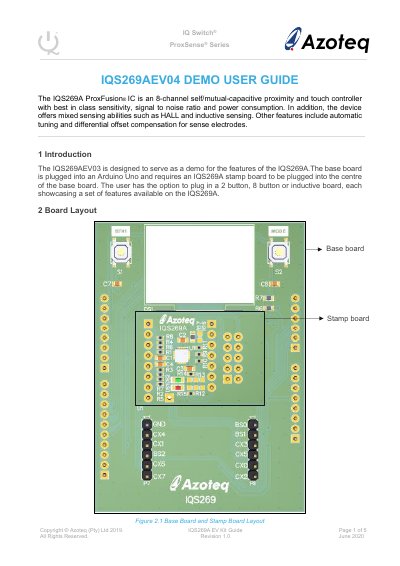
This guide describes the IQS269AEV03 evaluation kit for the IQS269A ProxFusion IC, an 8-channel self/mutual-capacitive proximity and touch controller with mixed sensing abilities such as HALL and inductive sensing. The base board is plugged into an Arduino Uno and requires an IQS269A stamp board in its centre; the user can also plug in a 2 button, 8 button or inductive board, each showing a different set of the device's features.
The guide covers the base board and stamp board layout, the software file to upload for each button board, and the display modes of the two button board (default and dynamic C mode), the eight button board (8btn and AbsCap mode) and the inductive board (coil mode). It also explains the MODE button and button 1 functions, including the HEAT and reference channel functions used to simulate environmental changes.
| Controller type | 8-channel self/mutual-capacitive proximity and touch controller |
|---|---|
| Mixed sensing | HALL and inductive sensing |
| Additional features | Automatic tuning and differential offset compensation for sense electrodes |
| Power modes | Normal power, low power and ultra-low power |
| Host board | Arduino Uno |
| Supported button boards | 2 button, 8 button or inductive board |
It is an 8-channel self/mutual-capacitive proximity and touch controller that also offers mixed sensing abilities such as HALL and inductive sensing.
The base board is plugged into an Arduino Uno, with an IQS269A stamp board plugged into the centre of the base board.
The file IQS269A_AZP985A03_2button_V2. 3.0 is uploaded to the Arduino Uno for the two button demonstration.
It can be used to skip the start-up routine and changes the mode between default mode and dynamic C mode.