
User guide for the Analog Devices ADP1650-EVALZ evaluation board, covering software setup, GUI use, LED current programming, and fault status.
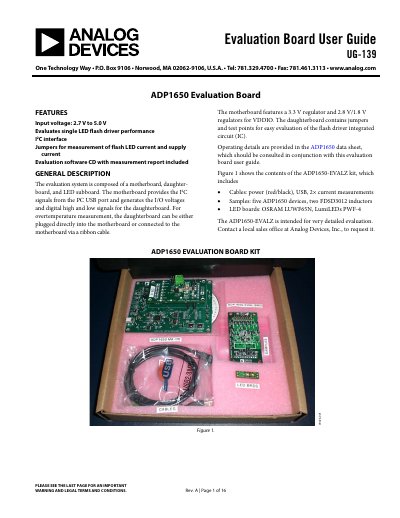
The ADP1650-EVALZ evaluation board from Analog Devices is intended for very detailed evaluation of a single LED flash driver. The evaluation system is composed of a motherboard, a daughterboard, and an LED sub board.
The user guide covers installing the LabVIEW run-time engine and ADP1650 evaluation software, installing the USB driver, and using the software GUI. It also describes LED current programming, flash and torch control, timeout programming, fault detection status, low VBAT, DC current limit, evaluation board schematics, and bill of materials.
| Input voltage | 2.7 V to 5.0 V |
|---|---|
| Interface | I2C |
| Maximum timeout | 1600 ms |
| Overvoltage fault threshold | 5.3 V typical |
| Overtemperature fault threshold | 150°C |
The kit includes five ADP1650 devices and two FDSD3012 inductors as samples.
Use a maximum Flash Current setting of 300 mA to avoid exceeding the USB current source capability of 500 mA.
Timeout is hardware limited to a maximum of 1600 ms.
A thermal fault occurs when the device junction temperature is greater than 150°C.