
The Acer Veriton P330 F2 workstation specifications detail processor options, memory capacity, storage, graphics, and connectivity.
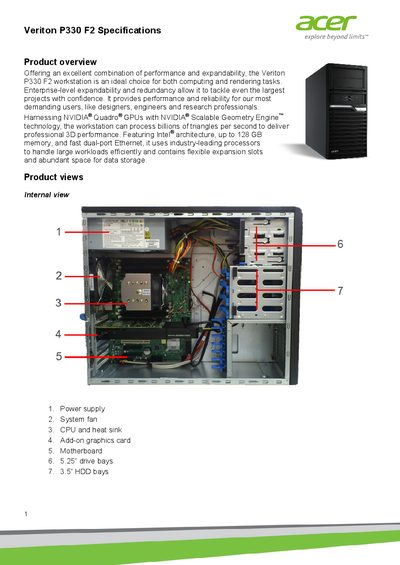
The Veriton P330 F2 is a mini‑tower workstation designed for demanding computing and rendering tasks. It offers enterprise‑level expandability, dual‑port Ethernet, and support for high‑performance NVIDIA® Quadro® graphics.
Key specifications include Intel® Xeon® E5 v2 processor support, up to 128 GB of registered DDR3 ECC memory, 900 W or 500 W 80 PLUS® Gold power supplies, and flexible storage options ranging from 12 TB SATA HDDs to SSDs. The system provides multiple PCIe 3.0 slots, dual Gigabit LAN ports, and extensive USB connectivity.
| Supported processors | Intel® Xeon® E5 v2 series |
|---|---|
| Maximum memory | 128 GB registered DDR3 ECC |
| Power supply options | 900 W or 500 W 80 PLUS® Gold |
| Maximum SATA HDD capacity | 12 TB |
| Network ports | 2 × Gigabit LAN |
The workstation supports Intel® Xeon® E5‑1600 or E5‑2600 v2 processors.
It can hold up to 128 GB of registered DDR3 ECC memory, or up to 64 GB of unregistered memory.
The system supports 3.5" and 2.5" SAS, SATA, or SSD drives, with up to 12 TB of SATA HDD capacity.
It supports NVIDIA® Quadro® and NVIDIA® Tesla graphics cards.