
ETR9360 is a 1T1R wireless single-chip 11N wireless handheld AP/Router router, which has 3 times the bandwidth than 802.11g. With its compact design, you can share 3G/3.5G or ADSL networks, and it also has a user-friendly WPS function.
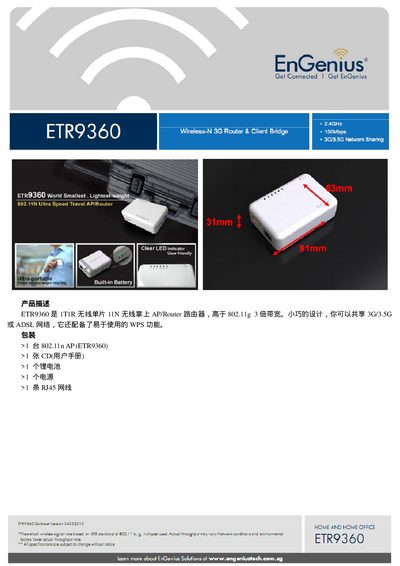
This manual describes the Asus ETR9360 handheld AP/router, a compact 1T1R 802.11n device that can share 3G/3.5G or ADSL connections and includes WPS for easy setup. The package contains the router, a CD with the user manual, a lithium battery, a power adapter, and an RJ45 Ethernet cable.
The guide covers hardware specifications, RF parameters, software functions, network and security features, firmware upgrade procedures, and system monitoring. Detailed tables list supported wireless modes, data rates, antenna details, and power consumption, while the configuration sections explain WAN/LAN settings, DHCP, VPN, parental controls, and more. This manual is written in Chinese.
| MCU | RT3050 |
|---|---|
| SDRAM | 32 MB |
| Flash | 4 MB |
| PCB size | 80 mm × 54 mm |
| WAN/LAN | 10/100 Mbps Fast Ethernet |
| Operating frequency | 2.400 ~ 2.484 GHz |
| Antenna | 2 dBi embedded |
| Battery | 3.7 V 1800 mAh Li‑ion |
Press the WPS button for 2 seconds to start WPS mode.
The device operates from 0 °C to 40 °C.
Hold the reset button for more than 10 seconds to restore factory defaults.
The router supports 802.11b, 802.11g, and 802.11n modes.