
This manual introduces the basic operation methods of KONICA MINOLTA DI152/183 photocopier, including selecting paper, zoom ratio, black and white reversal and other functions.
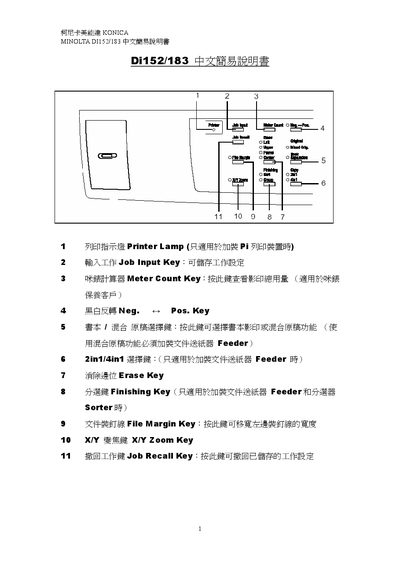
This guide introduces the main control‑panel keys of the DIT132/183 copier, such as the Printer Lamp, Job Input, Meter Count, Zoom, and Access keys, and explains their basic functions. It also describes paper handling options, including automatic paper selection, manual paper selection, and bypass‑tray size selection.
Additional sections cover exposure settings (auto and manual), book copying mode, margin line handling, and troubleshooting signals. The manual provides step‑by‑step instructions for common tasks like adjusting zoom ratio, clearing settings, and resetting the panel. This manual is written in Chinese.