
Key facts
- Manuals
- 7
- Categories
- 1
- Languages
- ZH
- Last added
- 2012-03-12
Featured 柯尼卡美能达 manuals
Konica Minolta PagePro 9100 User Manual
This manual covers all aspects of using the PagePro 9100 laser printer, including software installation for Windows, Mac, UNIX and Linux, driver setup, and optional utilities. Detailed steps guide you through connecting the printer, loading drivers, and configuring PPD files for each supported operating system.
It also explains how to replace consumables such as toner cartridges and filters, load and store various media types, perform routine cleaning, and resolve common errors like paper jams or lock‑out conditions. Installation of accessories such as additional paper trays, duplex units, and memory modules is described, followed by technical specifications and compliance information. This manual is written in Chinese.
Covers: Software Installation · Replacing Consumables · Using Media · Maintaining the Printer · Troubleshooting · Installing Accessories
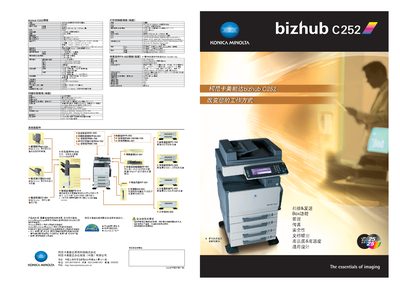
Konica Minolta bizhub C252 Product Specification Sheet
The bizhub C252 is a compact multifunction printer that combines high‑speed scanning, printing, copying and faxing in a single device. It supports network scanning to email, FTP, SMB and the built‑in Box storage, and offers advanced security features such as password protection, data deletion and IP filtering.
Technical specifications include a 466 MHz PPC750 FX CPU, 1 024 MB shared memory, 25 pages/min scan and print speeds for A4, up to 3 350 sheets total paper capacity, and a 40 GB hard drive delivering up to 1 800 dpi main resolution. The unit measures 650 × 755 × 771 mm and weighs about 95 kg, meeting Energy Star standards. This manual is written in Chinese.
Covers: 扫描功能规格 · 打印控制器规格 · 系统选配件 · 管理 · 传真 · 安全性
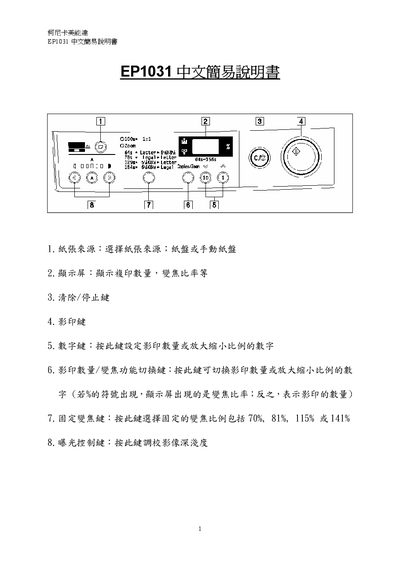
Konica Minolta EP1031 Copier Simple Manual
The EP1031 Simple Manual provides step‑by‑step instructions for everyday use of the Konica Minolta EP1031 copier. It describes how to select the paper source, interpret the display, and operate the main keys such as Clear/Stop, Copy, Numeric, and Zoom Switch.
Additional sections cover error messages, image density adjustment, copy quantity setting, zoom ratio adjustment, and checking the total number of copies made. The guide is intended for users who need quick reference to perform common copying tasks. This manual is written in Chinese.
Covers: Paper Source Selection · Display Screen Functions · Key Operations (Clear/Stop, Copy, Numeric, Zoom Switch) · Fixed Zoom Ratios · Exposure Control and Image Density · Error Messages
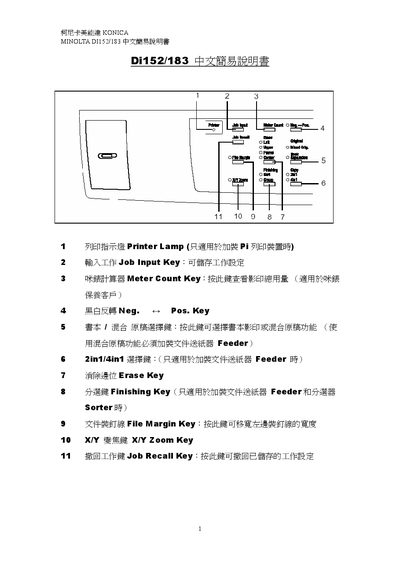
Konica Minolta Di152/183 chinese easy Manual
This guide introduces the main control‑panel keys of the DIT132/183 copier, such as the Printer Lamp, Job Input, Meter Count, Zoom, and Access keys, and explains their basic functions. It also describes paper handling options, including automatic paper selection, manual paper selection, and bypass‑tray size selection.
Additional sections cover exposure settings (auto and manual), book copying mode, margin line handling, and troubleshooting signals. The manual provides step‑by‑step instructions for common tasks like adjusting zoom ratio, clearing settings, and resetting the panel. This manual is written in Chinese.
Covers: Control Panel Keys · Paper Handling · Zoom Functions · Exposure Settings · Book Copying · Error and Warning Signals
Latest 柯尼卡美能达 manuals
Konica Minolta PagePro 9100 User Manual
User Manual 178 pages · 9.1 MB · ZHThe Konica Minolta PagePro 9100 user manual provides installation, operation, maintenance, and troubleshooting instructions for the printer.
Konica Minolta bizhub C252 Product Specification Sheet
Datasheet 6 pages · 2.5 MB · ZHThe Konica Minolta bizhub C252 specification sheet details its scanning, printing, copying, faxing functions and technical parameters.
Konica Minolta EP1031 Copier Simple Manual
User Manual 5 pages · 204 KB · ZHThis manual explains basic operation of the Konica Minolta EP1031 copier, covering paper source, display functions, key controls, image density, zoom, and…
Konica Minolta Di152/183 chinese easy Manual
Quick Start Guide 8 pages · 222 KB · ZHA concise Chinese quick‑start guide for the Konica Minolta DIT132/183 copier covering key functions and basic operation.
Konica Minolta EP1085 chinese easy Manual
Konica Minolta PagePro 1250E Laser Printer Installation Guide
Installation Guide 2 pages · 1015 KB · ZHInstallation guide for the Konica Minolta PagePro 1250E laser printer, covering unpacking, setup, safety, and driver installation.
Konica Minolta FLASH METER VI Manual
Which document do I need?
User Manual
Day-to-day operation, settings and troubleshooting. Start here if the product is already set up.
Datasheet
Ratings, dimensions and ordering codes, for selection and design work.
Quick Start Guide
The shortest path to a working setup, usually only a few pages.
Installation Guide
Mounting, wiring and first power-up. Read it before the hardware goes in.
Questions answered in 柯尼卡美能达 manuals
Why does the printer not print anything?
Check the control panel for a key‑lock, paper‑jam, or other error message, verify that the correct driver and media settings are selected, and ensure the power matches the printer’s requirements.
How can I prevent paper jams?
Make sure the media matches the printer’s specifications, keep the paper flat and properly aligned, store it in a dry place, and adjust the paper guides after loading.
What is the scan speed of the bizhub C252?
The device scans at 25 pages per minute for A4 size documents.
From: Konica Minolta bizhub C252 Product Specification Sheet
How many sheets can the C252 hold in its large paper tray?
The large capacity tray can hold up to 3,350 sheets of paper.
From: Konica Minolta bizhub C252 Product Specification Sheet
How do I select the paper source?
Choose the paper source; either the paper tray or the manual feed tray.
What does the error message indicating a need for toner mean?
It means toner is low and you should call 2565‑2139 to order more.