
The TANDBERG 990 MXP IVC-TRAIN/TANDBERG 990/TANDBERG 990 User Guide provides information on how to use the TANDBERG 990 MXP IVC-TRAIN/TANDBERG 990/TANDBERG 990 for video conferencing.
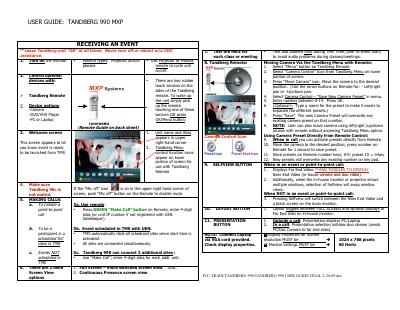
This user guide explains how to operate the Tandberg 990 MXP IVC-TRAIN video conferencing terminal for events and point-to-point calls. It covers turning on the monitor, waking the unit with the Tandberg remote, making calls, scheduled TMS events, screen view options, and microphone testing.
It also describes camera control and preset storage, the Selfview and Layout buttons, and the Presentation button for sending PC, laptop, or document camera video to far end sites.
| Additional sites connectable | 3 additional sites |
|---|---|
| Camera preset number range | 0-14 |
| Remote keypad preset storage | 0-9; preset 10 = 0-key |
| Presentation display resolution | 1024 x 768 pixels |
| Presentation refresh rate | 60 Hertz |
Pick up the remote while touching one of the two rubber touch sensors on its sides, or press the OK/Menu button.
Press the green "Make Call" button on the remote and enter the 4-digit alias, or the unit IP number if it is not registered with a UEN Gatekeeper.
There are two main options: Full Screen, which is a voice switched screen view, and Continuous Presence screen view.
Move the camera to the desired position, select "Save New Camera Preset" in Camera Control, enter a number between 0 and 14, and press Save. The new preset overwrites any existing preset on that number.