
Setup guide for Dell computers.
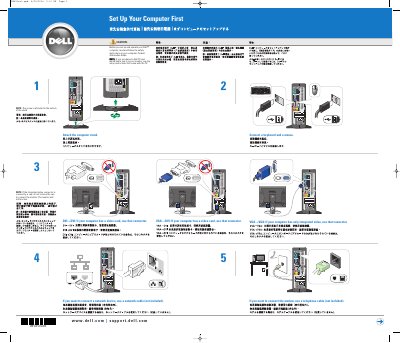
This two-page Dell setup guide walks through setting up a Dell Dimension 8200 computer. It shows which video connector to use for DVI-to-DVI, VGA-to-DVI and VGA-to-VGA setups, how to attach the computer stand, and how to connect a keyboard and mouse. It then covers connecting a network device with a network cable or a modem with a telephone cable, plugging the computer and monitor into electrical outlets, and turning them on.
The last part describes what is behind the front door: a CD or DVD drive, an optional Flash Card Reader, an optional IEEE 1394 connector, two front USB 2.0 connectors and a headphone connector. It also explains how to open the Owner's Manual from the Windows desktop and where to find Help and Support.
| Front USB connectors | 2 (USB 2.0) |
|---|---|
| IEEE 1394 connector | Optional |
| Flash Card Reader | Optional |
| Optical drive | CD or DVD drive |
| Headphone connector | Disables speaker sound when used |
Read and follow the safety instructions in the computer's Product Information Guide.
If the computer has a video card, use the connector on that card; if it has only integrated video, use the integrated connector.
Use a network cable, which is not included.
Double-click the owner's manual icon on the Microsoft Windows desktop.