
Dell Inspiron 3656 Quick Start Guide.
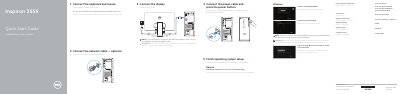
Quick start guide for the Dell Inspiron 3656 computer. It shows how to connect the keyboard and mouse, an optional network cable, the power cable and the display, and then how to finish operating system setup for Windows or Ubuntu.
The second page lists the computer's ports and features, including USB, audio, VGA, HDMI and network ports, and points to Dell apps such as SupportAssist, Dell Backup and Recovery, and Dell Help & Support, along with product support and regulatory links.
| USB 3.0 ports | 2 |
|---|---|
| USB 2.0 ports | 4 |
| Audio ports | 3 |
| Regulatory model | D19M |
| Regulatory type | D19M001 |
Connect the display to the discrete graphics card instead of the onboard video port.
The listed features include an optional optical drive, a media-card reader, a headset port, USB 3.0 and USB 2.0 ports, audio ports, VGA and HDMI ports, a network port, expansion-card slots and a security-cable slot.
Dell points to Dell.com/support for product support and Dell.com/support/manuals for manuals.
The guide covers finishing setup for Windows and for Ubuntu.