
The Dell W2600 LCD TV features a 26-inch screen with a resolution of 1366 x 768 and a 16:9 aspect ratio. It has a brightness of 300 cd/m2 and a contrast ratio of 800:1. It has two HDMI ports, one component video port, one S-Video port, and one composite video port. It also has a headphone jack and an optical audio output port.
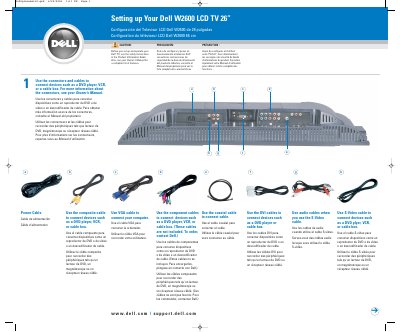
This two-page setup placemat for the Dell W2600 26-inch LCD TV shows how to connect devices such as a DVD player, VCR, or cable box using the composite cable, component cables, coaxial cable, DVI cables, S-Video cable with audio cables, and how to connect a computer with the VGA cable. It then covers installing batteries in the remote control, plugging in the power cable, and turning the TV on. The steps are printed in English, Spanish, and French.
The guide explains how to pick the proper input source with the Input button on the remote, listing VGA, DVI, TV, and AV1 through AV6 and where each connector is located on the TV. It notes that the component cables are not included and can be ordered from Dell, that the on-screen display is opened with the Menu button, and that the Owner's Manual and Product Information Guide should be consulted for the complete feature list, connector details, and safety instructions.
| Screen size | 26 inches (66 cm) |
|---|---|
| VGA input | VGA connector on the bottom of the TV |
| DVI input | DVI-HDCP connector on the bottom of the TV |
| TV (antenna/cable) input | ANT/Cable connector on the bottom of the TV |
| AV1 | Composite connector on the side of the TV |
| AV2 | Composite connector on the bottom of the TV |
| AV3 | S-Video connector on the side of the TV |
| AV4 | S-Video connector on the bottom of the TV |
| AV5 and AV6 | Component connectors on the bottom of the TV |
Select the input based on which connectors you used, then press Input on the remote control to switch to it. If you used the ANT/Cable connector, select TV from the Input Source menu.
Press Menu on the remote control to access the on-screen display and adjust settings, including the input source.
Use the VGA cable to connect your computer to the VGA connector on the bottom of the TV.
No, the component cables are not included; you can contact Dell to order them.