
The document provides instructions on how to use a Dell computer, including how to connect the power adapter, turn on the power, and connect to a wireless network.
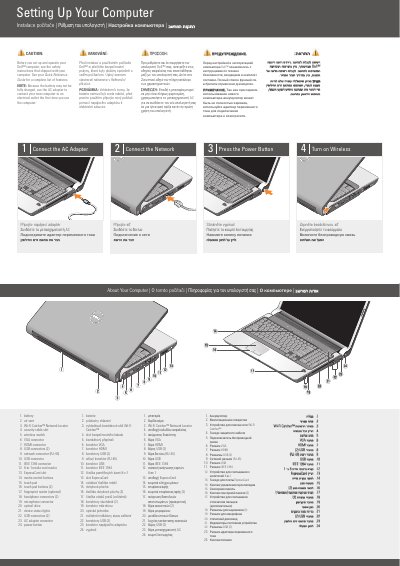
This two-page Dell guide explains the initial setup of a notebook computer, including connecting the AC adapter and network, pressing the power button, and turning on wireless. It also includes a numbered diagram of the computer's ports, connectors, and controls.
Additional sections cover finding answers in the Quick Reference Guide or on support.dell.com and an optional wireless network setup. Safety and first-use notes advise reading the shipped safety instructions and using the AC adapter because the battery may not be fully charged.
| USB connectors | 2 |
|---|---|
| Headphone connectors | 2 |
| Touch pad buttons | 2 |
| Media card reader | 8-in-1 |
Read the safety instructions that shipped with the computer.
Because the battery may not be fully charged.
See the Quick Reference Guide or go to support.dell.com.
No, the wireless network section is labeled optional.