
Dell Computer Setup and Quick Start Guide

This document provides instructions on how to use a Dell computer.
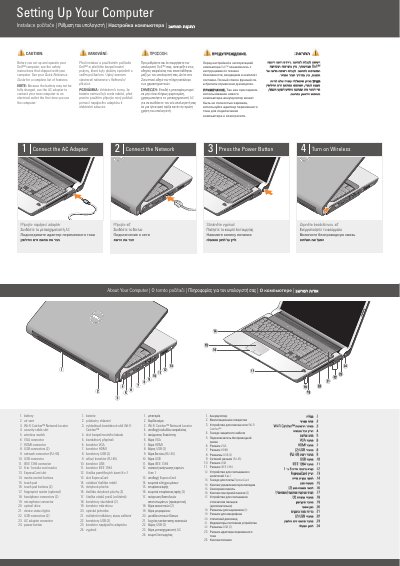

Dell Computer Setup and Quick Start Guide - cover page
Brand
DELL
Category
Desktops
Document type
User Manual
Language
English
Pages
2
File format
PDF
File size
1.1 MB
Published
25 November, 2023
Updated
25 November, 2023
MD5 checksum
F50E6D959734359D85A08873B44AF643

About this manual

This document provides initial setup instructions for a Dell computer, covering the connection of the AC adapter and the power button. It includes a visual guide to the computer's physical ports and components, such as USB connectors, HDMI, VGA, and the fingerprint reader.

What's inside

  • Connect the AC Adapter
  • Connect the Network
  • Press the Power Button
  • Turn on Wireless
  • About Your Computer
  • Wireless Network Setup

Frequently asked questions

What should I do before setting up and operating the computer?

See the safety instructions that shipped with your computer.

Why should I use the AC adapter the first time I use the computer?

Because the battery may not be fully charged.

What is the first step in setting up the computer?

Connect the AC adapter.

Where can I find more information about using the computer?

See your Quick Reference Guide for more information about using your computer.

Download PDF (1.1 MB)

More DELL Manuals


View all DELL manuals →