
The Dell Wyse 5000 Series Thin Client Wyse 5060 Quick Start Guide provides instructions on how to install the stand, connect the keyboard and mouse, connect the power cable and press the power button, connect the display and press the power button, and connect the network interface.
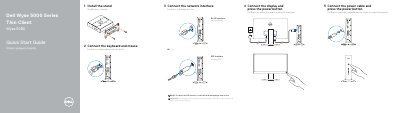
The Dell Wyse 5060 Quick Start Guide provides basic instructions for installing the stand and connecting essential peripherals including the keyboard, mouse, power cable, display, and network interface.
It also includes a detailed map of the device's features, identifying various ports such as USB 2.0, USB 3.1 Gen 1, DisplayPort, and optional network interfaces.
| Power Port | +19V |
|---|---|
| Network Interface | 10/100/1000 Base-T (optional) |
| USB Ports | USB 2.0 and USB 3.1 Gen 1 |
To remove the SFP interface, rotate the latch and unplug it from its slot.
The power port is +19V.