
The Dell TM 1708FP-BLK USFF AIO Flat Panel Monitor is a 17-inch monitor with the following features: - Resolution of 1280 x 1024 - Brightness of 300 cd/m2 - Contrast ratio of 1000:1 - Response time of 8ms - Viewing angles of 170°/160° - Inputs include DVI, VGA, and USB - Supports wall-mounting
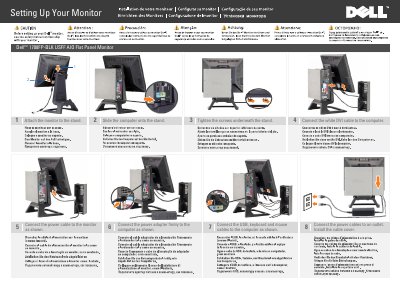
This two-page setup guide for the Dell 1708FP-BLK flat panel monitor shows, in eight numbered steps, how to attach the monitor to its stand, slide the computer onto the stand, tighten the screws underneath, connect the white DVI cable, the monitor power cable, the power adapter, and the USB, keyboard and mouse cables, plug the power cables into an outlet and install the cable cover. A closing note points readers to the User's Guide on the Drivers and Documentation media that ships with the monitor.
The second page is a labeled diagram of the monitor in English, German, French, Italian, Spanish and Portuguese, identifying the USB downstream port, Input Select button, OSD Menu/Select, Brightness & Contrast/Down(-) button, Auto-Adjust/Up(+) button, power button with power light indicator, tilt adjustment, height adjustment, security lock slot, cable cover release button, USB up/downstream ports and stand removal button. Copyright is Dell Inc., 2008, with Dell Part No. U397J A00.
| Tilt adjustment | Supported |
|---|---|
| Height adjustment | Supported |
| Security | Security lock slot |
| USB ports | USB downstream port and USB up/downstream ports |
| Video connection | White DVI cable to the computer |
| Controls | Input Select, OSD Menu/Select, Brightness & Contrast/Down(-), Auto-Adjust/Up(+), power button with power light indicator |
Attach the monitor to the stand, slide the computer onto the stand, tighten the screws underneath, then connect the white DVI cable to the computer and the power cable to the monitor.
See the User's Guide on the Drivers and Documentation media that ships with the monitor.
Yes, the monitor provides tilt adjustment and height adjustment.
Yes, the monitor has a security lock slot.