
This document describes how to connect a monitor, keyboard, and mouse to a Dell computer.
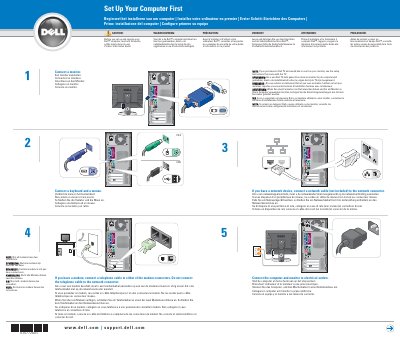
This two-page Dell setup guide gives multilingual instructions for setting up a Dell computer. It shows how to connect a monitor, a keyboard and mouse, the computer and monitor to electrical outlets, a modem or network cable, and speakers.
The guide also explains how to view and print the Owner's Manual from the Windows desktop and where to find Help and Support or Microsoft Windows XP Tips. It includes a caution to read the safety instructions in the Product Information Guide before setup and operation.
Read and follow the safety instructions in the Product Information Guide.
Double-click the owner's manual icon on the Microsoft Windows desktop.
Click the Start button and click Help and Support, or click Microsoft Windows XP Tips for help with the Windows operating system.
No. If you have a modem, connect the telephone cable to either modem connector, not the network connector.