
Dell U2412M Monitor User Guide

This document describes the features and specifications of the Dell U2412M monitor.
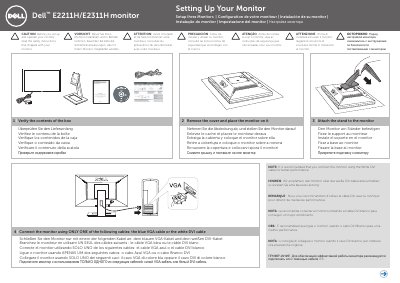

Dell U2412M Monitor User Guide - cover page
Brand
DELL
Category
Monitor
Document type
Installation Guide
Language
English
Pages
2
File format
PDF
File size
2.7 MB
Published
25 November, 2023
Updated
25 November, 2023
Models
E2211H, E2311H
MD5 checksum
E85BD7E24D7E23646D1242D13EE1D0AF

About this manual

This document is a pictorial setup guide for the Dell E2211H/E2311H monitor. It shows how to verify the box contents, remove the cover, attach the stand, connect one video cable, connect power, and adjust the monitor.

It also lists monitor controls and shortcut keys, and notes that the white DVI cable is recommended for better performance. More detailed information is available in the User's Guide on the media shipped with the monitor.

What's inside

  • Verify the contents of the box
  • Remove the cover and place the monitor on it
  • Attach the stand to the monitor
  • Connect the monitor using only one cable
  • Adjust the monitor
  • Connect the power cable and press the power button
  • Monitor controls and shortcut keys

Frequently asked questions

Which cable should I use to connect the Dell E2211H/E2311H monitor?

Connect the monitor using only one of the following cables: the blue VGA cable or the white DVI cable. The white DVI cable is recommended for better performance.

How do I turn on the monitor after connecting it?

Connect the power cable and press the power button.

What should I do before setting up and operating the monitor?

Read the safety instructions that shipped with the monitor.

Download PDF (2.7 MB)

More DELL Manuals


View all DELL manuals →