
Dell™ 1350cnw Color Printer Quick Reference Guide
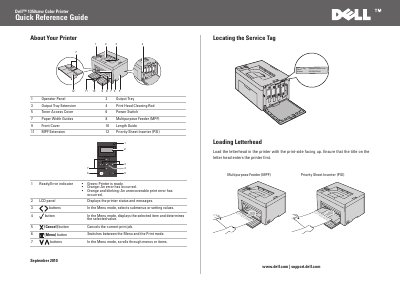
The Dell 1350cnw Color Printer Quick Reference Guide identifies printer parts and operator panel controls, and shows how to load letterhead and envelopes. It also explains how to print the printer settings page and where paper jams may occur.
The guide points to the Setup Guide and User's Guide on the Drivers and Utilities disc for setup, jam clearing, troubleshooting, toner replacement, and cleaning information.
Press the Menu button, ensure Report/List appears and press the button, then ensure Printer Setting appears and press the button. The printer settings page is printed.
Load the letterhead with the print-side facing up, and ensure that the title on the letterhead enters the printer first.
Paper jams may occur at the output tray, transfer belt, fuser release lever, rear cover, front cover, or multipurpose feeder.
An unrecoverable print error has occurred.