
This document is a manual for Dell computers. It describes how to install, use and maintain a Dell computer.
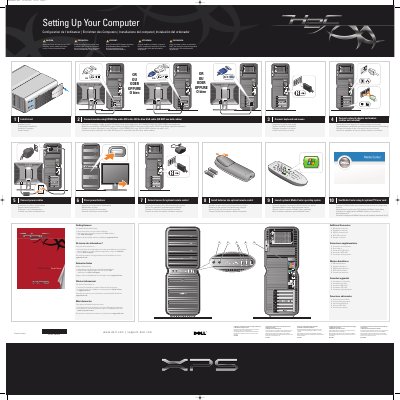
This Dell document, titled "Setting Up Your Computer," is a multilingual setup guide for a Dell computer. It walks through numbered steps for installing the stand, connecting a monitor with a white DVI or blue VGA cable, connecting a keyboard, mouse, network adapter and modem, and attaching power cables.
The guide also covers pressing the power buttons, using an optional remote control and sensor, launching an optional Media Center operating system, and identifying additional connectors. It includes a caution to read the safety instructions in the Product Information Guide and points to support.dell.com for support and educational tools.
| Monitor connection | White DVI cable or blue VGA cable; do not use both |
|---|---|
| USB 2.0 connectors | 2 |
| Network and modem cables | Not included |
Use either the white DVI cable or the blue VGA cable, but do not use both cables.
See the safety instructions in the Product Information Guide.
Support and educational tools are available at support.dell.com.
See the Media Center setup instructions for the optional TV tuner card.