
This guide describes how to set up a Lenovo computer on Windows 7, 8, and 10.
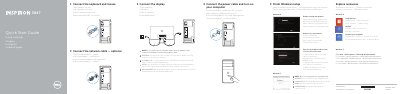
This quick start guide walks users through the initial setup of the Dell Inspiron 3847 desktop. It covers connecting the keyboard, mouse, optional network cable, power cable, and display, with a note to connect the display to a discrete graphics card if present. It then guides through finishing Windows 7 or Windows 8 setup, enabling security and updates, signing in to a Microsoft account or creating a local account, and connecting to a network.
The guide also includes a labeled diagram of the computer's front and rear features, listing ports such as USB 2.0, USB 3.0, HDMI, VGA, audio ports, expansion card slots, and security cable slot. It provides links to Dell support, manuals, regulatory compliance, and contact information.
| Front USB 2.0 ports | 2 |
|---|---|
| Rear USB 2.0 ports | 4 |
| USB 3.0 ports | 2 |
| HDMI port | 1 |
| VGA port | 1 |
| Audio ports | 3 |
| Network port | 1 |
| Media card reader | 1 |
Connect the display to the discrete graphics card.
No, do not use the @ symbol in your password.
Visit dell.com/support or dell.com/support/manuals.