
The Dell Precision Mobile Workstation 7000 Series Quick Start Guide provides instructions on how to connect the power adapter, finish operating system setup, enable security and updates, and connect to a network.
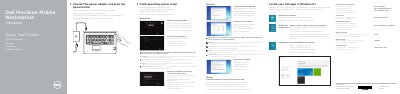
This two-page quick start guide for the Dell Precision 7000 Series mobile workstation, identified on the document as Dell Precision -7710, shows how to connect the power adapter and press the power button. It then walks through finishing operating system setup, enabling security and updates, connecting to a network, and signing in with a Microsoft account or creating a local account.
The guide also points to Dell apps in Windows 8.1, product support and manuals at dell.com/support/manuals, and tools such as SupportAssist, registration, and Dell Backup and Recovery. A labeled features page lists ports, status lights, readers, speakers, touchpad, docking connector, service-tag label, and door and battery release latch.
| Computer model | Dell Precision 7710 |
|---|---|
| Regulatory model | P29E |
| Regulatory type | P29E001 |
| Camera | Optional |
| Fingerprint reader | Optional |
| USB-C connector | Optional |
Connect the power adapter and press the power button.
Enter the password for the wireless network access when prompted.
Dell points to the Owner’s Manual at dell.com/support/manuals.
The guide lists SupportAssist for checking and updating your computer.