
Dell™ W4201C/W5001C 42" & 50" Plasma TV Setup Guide
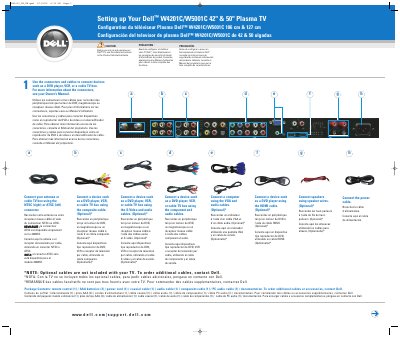
This two-page Dell setup placemat shows how to set up a Dell W4201C/W5001C 42-inch or 50-inch plasma TV. It walks through connecting the power cable, connecting devices such as a DVD player, VCR or cable TV box with composite, S-Video, component or HDMI cables, connecting an antenna or cable TV box to the NTSC or ATSC connector, attaching speakers, and connecting a computer with VGA and audio cables.
The guide also covers installing batteries in the remote control, turning the TV on, pressing Input and selecting the correct input source, and presetting viewable channels through the Main Menu (Setup > Channel Setup > Channel Search). It lists the package contents, notes that optional cables are not included, and is printed in English, French and Spanish.
| Screen sizes | 42 inches (106 cm) and 50 inches (127 cm) |
|---|---|
| Input sources | VGA, HDMI 1, HDMI 2, TV (NTSC), Digital TV (ATSC), AV1–AV6, AV SIDE (Composite 3 / S-Video 3) |
| ATSC connector availability | Only on the 4200HD model |
| Channel presetting path | Main Menu > Setup > Channel Setup > Channel Search |
| Package contents | Remote control (1), AAA batteries (3), power cord (1), coaxial cable (1), audio cable (1), component cable (1), PC audio cable (1), documentation |
Press Input on the remote control or on the TV, then choose the source that matches the connectors you used, for example VGA, HDMI 1, HDMI 2, TV, DIGITAL TV or one of the AV inputs.
Go to the Main Menu, select Setup, select Channel Setup and then Channel Search. If you use both the NTSC and ATSC connectors, preset the channels for both the Digital TV and the TV input source.
The package contains a remote control (1), AAA batteries (3), a power cord, a coaxial cable, an audio cable, a component cable, a PC audio cable and documentation.
No, optional cables are not included with the TV; additional cables can be ordered from Dell.