
Dell B2375dfw / B2375dnf Mono MFP Quick Reference Guide

Dell™ B2375dfw / B2375dnf Mono MFP Quick Reference Guide
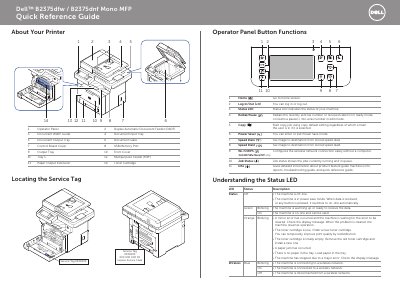

Dell B2375dfw / B2375dnf Mono MFP Quick Reference Guide - cover page
Brand
DELL
Category
All-in-one printer
Document type
Quick Start Guide
Language
English
Pages
10
File format
PDF
File size
9.6 MB
Published
25 November, 2023
Updated
25 November, 2023
MD5 checksum
57F0B09994BBEEDEF88BECCA48EB595C

About this manual

The Dell B2375dfw and B2375dnf Mono MFP Quick Reference Guide provides an overview of the printer's hardware components and operator panel. It includes details on button functions, such as Home, Log In/Out, and Copy, as well as a guide to understanding the Status LED and Wireless Status indicators.

The document also provides instructions for loading letterhead and envelopes, identifying paper jam locations, and printing printer settings. It refers users to the full User's Guide for detailed troubleshooting, cleaning, and toner replacement.

What's inside

  • About Your Printer
  • Operator Panel Button Functions
  • Understanding the Status LED
  • Loading Letterhead
  • Loading Envelopes
  • Identifying the Location of Paper Jams
  • Printing the Printer Setting
  • Setting Up Wireless Connection

Frequently asked questions

How do I print the printer settings page?

From the home screen, press My Settings → Machine Setup → Reports → Printer Settings, then press Start on the screen.

How should envelopes be loaded to prevent wrinkling?

DL and Monarch envelopes should be loaded with the print-side facing up, flap opened, and facing the user.

Download PDF (9.6 MB)

More DELL Manuals


View all DELL manuals →