
This document describes the steps to install the Dell printer software.
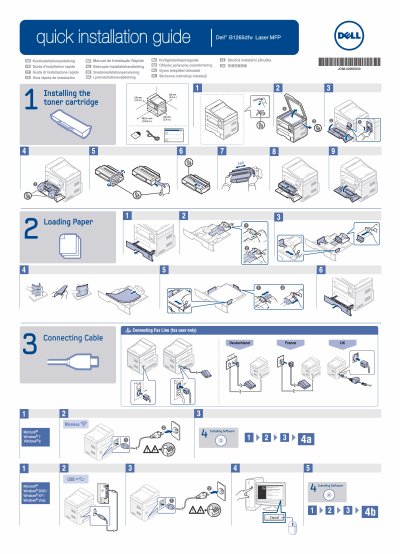
This Dell MonoMFP printer quick installation guide presents the setup sequence for installing the toner cartridge, loading paper, connecting cables, and installing software. It also includes a fax line connection step for fax users and instructions for viewing the User's Guide.
The guide gives steps in multiple languages and offers an alternative download from the Dell support website. It advises reading the safety guidelines in the Product Information Guide before using the product.
The first step is installing the toner cartridge.
The guide says to go to http://www.dell.com/support in your computer's browser and follow the on-screen instructions.
Read the safety guidelines in the Product Information Guide before using the product.
Fax users should connect the fax line.