
Dell Mobile Broadband Card Installation Guide.
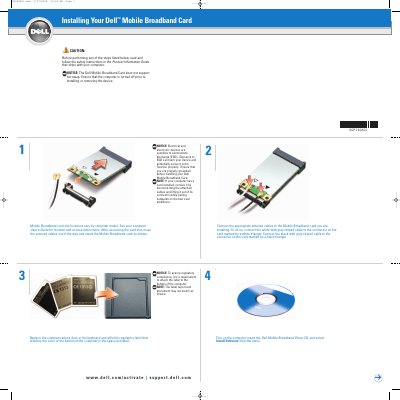
Before installing the Dell Mobile Broadband Card, read the safety instructions in the Product Information Guide and follow electrostatic discharge precautions. The computer must be turned off because the card does not support hot swap. After accessing the card slot, insert the card and connect the white with gray striped cable to the connector marked by a white triangle and the black with gray striped cable to the connector marked by a black triangle. Replace the communications door or keyboard and affix the matching regulatory label to the bottom of the computer.
Turn on the computer, insert the Dell Mobile Broadband Driver CD, and select Install Software. To access the Internet, activate Sprint Mobile Broadband Service online or by calling 1-800-228-6303, entering the activation code, mobile number, and MSID. Consumer and business account details are listed for manual activation, and the ESN can be found in the Dell Mobile Broadband Card Utility under File→ Device Properties.
| Hot swap support | Not supported |
|---|
No. The computer must be turned off before installing or removing the card.
Connect the white with gray striped cable to the connector marked by a white triangle, and the black with gray striped cable to the connector marked by a black triangle.
Call 1-800-228-6303 for activation assistance.
Launch the Dell Mobile Broadband Card Utility and click File→ Device Properties.