
This document is a quick installation guide for Dell printers.
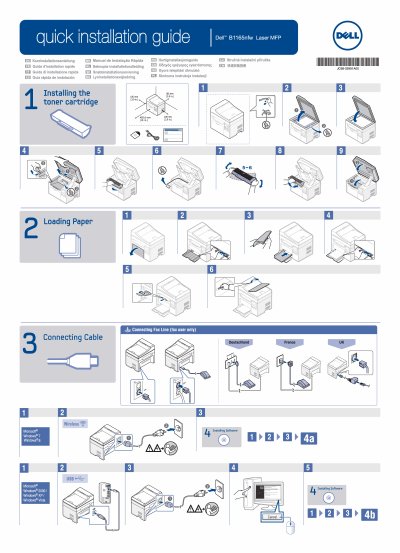
This two-page Dell printer quick install guide walks through the basic setup steps: installing the toner cartridge, loading paper, connecting a fax line for fax users, connecting the cable, and installing the software. It also shows how to select a connection method and set the printer driver.
The guide covers viewing the User's Guide and gives an alternative download path at dell.com/support. A note directs users to read the safety guidelines in the Product Information Guide before using the product. Windows, Mac and Linux platforms are shown.
| Supported Windows versions | Windows 2000, Windows XP, Windows Vista |
|---|---|
| Platforms shown | Mac, Linux, Windows |
The guide starts with installing the toner cartridge.
Read the safety guidelines in the Product Information Guide before using the product.
The guide says to open http://www.dell.com/support in your computer's browser and follow the on-screen instructions.
The guide lists Windows 2000, Windows XP and Windows Vista.