
The Dell S2218H/S2318H/S2318HX monitor is a 21.5-inch display with a resolution of 1920 x 1080 and a refresh rate of 60Hz. It also has a 5ms response time and a 1000:1 contrast ratio. The monitor has HDMI and VGA inputs.
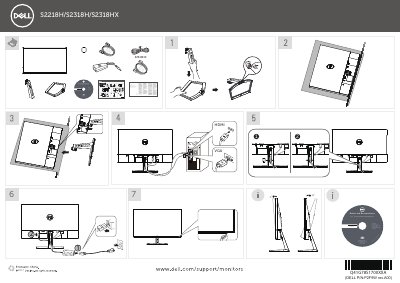
This is the printed setup sheet shipped with the Dell S2218H, S2318H and S2318HX monitors. It shows the video inputs on the back of the monitor and the tilt range of the stand, and it lists the drivers and documentation that come with the display.
The printed material points to the Drivers and Documentation media (P/N 9V5GR Rev. A00), which contains device drivers, the Quick Setup Guide, the User's Guide and Dell Display Manager Software. The sheet is dated January 2017 and carries the Dell part number P2F9W rev. A00.
| Video inputs | HDMI and VGA |
|---|---|
| Tilt range | -5° to 21° |
| Included on the Drivers and Documentation media | Device drivers, Quick Setup Guide, User's Guide, Dell Display Manager Software |
The setup sheet labels HDMI and VGA video inputs on the monitor.
It contains device drivers, the Quick Setup Guide, the User's Guide and Dell Display Manager Software.
The stand allows a tilt range of -5° to 21°.