
The Dell 5230/5350 Quick Reference Guide provides instructions on how to load paper and specialty media and how to load the 250-sheet or 550-sheet tray.
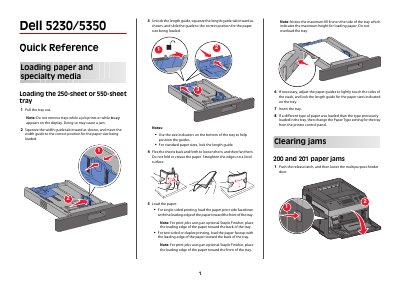
The guide explains how to load paper into the 250-sheet or 550-sheet tray, including adjusting width and length guides, orienting paper for single-sided or duplex printing, and setting the paper type on the control panel. It also notes the maximum fill line to avoid overloading.
It provides step-by-step instructions for clearing paper jams in multiple areas: 200/201 jams via the multipurpose feeder and front cover, 202/203 jams via the top rear door, and 241–245 jams by removing the indicated tray. Safety warnings cover hot surfaces and toner exposure.
| Tray capacity | 250-sheet or 550-sheet |
|---|---|
| Duplex printing | Supported |
| Paper size indicators | On tray bottom |
| Multipurpose feeder | Present |
Open the rear door and remove the paper from there.
The printer supports trays with capacities of 250 sheets or 550 sheets.
Load the paper print side facedown with the leading edge toward the front of the tray.
Load the paper faceup with the leading edge toward the back of the tray.