
The Dell C6522QT is a curved display with a resolution of 3440x1440 and a refresh rate of 120Hz. It also supports HDR10 and AMD FreeSync technology.
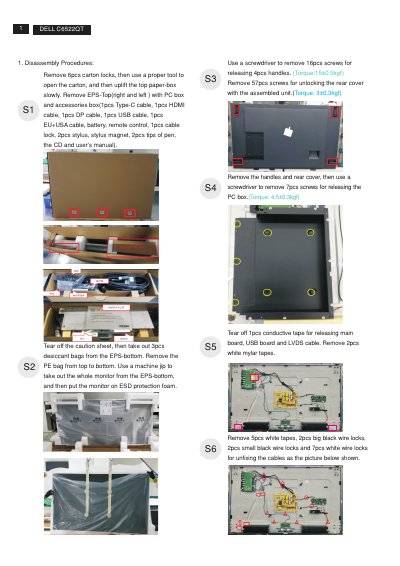
This document provides step-by-step teardown instructions for the Dell C6522QT monitor. It covers unpacking, removal of the rear cover, PC box, speakers, boards, bezels, panel, brackets, films, and other internal components, with screw counts and torque values for many steps.
It also lists required tools, describes removal of electrolyte capacitors from printed circuit boards, and identifies components and materials that require separate disposal or recovery under WEEE-related information.
| LCD display size category | Greater than 100 cm2 |
|---|---|
| Printed circuit boards | Surface greater than 10 square cm |
| External electric cable | Product has external cables |
| Electrolyte capacitors | Height greater than 25 mm and diameter greater than 25 mm |
The listed tools are a #1 Phillips screwdriver, a #2 Phillips screwdriver, a penknife, and a soldering iron with absorber.
The instructions state to remove 57 screws to unlock the rear cover with the assembled unit.
Cut the glue between the bulk capacitor and PCB, cut into the bottom of the bulk capacitor, remove the pin solder with a soldering iron and absorber, then lift the capacitor away.
The listed items include capacitors/condensers, printed circuit boards, an LCD display greater than 100 cm2, external electric cables, and electrolyte capacitors.