
HP computer quick start guide, introduces the setup and use of HP computers.
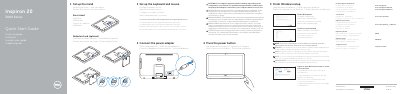
This guide covers initial setup of the Dell Inspiron 20 3000 Series computer, including stand assembly, keyboard and mouse setup, power adapter connection, and Windows setup. It also describes product features and ports and points to Dell support, registration, recovery media creation, and update tools.
The guide includes a caution that, depending on configuration, the computer may have a built-in battery and that the power adapter should remain connected when the computer is not in use for optimal battery performance. It identifies the computer model as Inspiron 20-3052 and the regulatory model as W15B.
| USB 3.0 ports | 2 |
|---|---|
| USB 2.0 ports | 2 |
| Optical drive | Optional |
In Windows search, type Recovery, click Create a recovery media, and follow the instructions on the screen.
Keep the power adapter connected to the computer when it is not in use.
Enter the password for the wireless network access when prompted.
Visit Dell.com/support and Dell.com/support/manuals.