
Dell Dimension Computer Setup Guide

Manual for Dell computer.
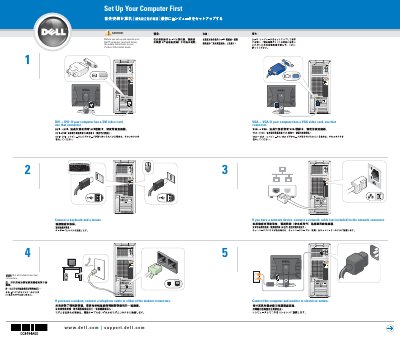

Dell Dimension Computer Setup Guide - cover page
Brand
DELL
Category
Desktops
Document type
User Manual
Language
English
Pages
2
File format
PDF
File size
3.1 MB
Published
20 November, 2023
Updated
20 November, 2023
MD5 checksum
167D0FB9FF7B975CE45F2F4ED4AB2E25

About this manual

This guide provides initial setup instructions for a Dell computer. It details how to connect essential peripherals such as a keyboard, mouse, monitor, and network cable to the appropriate video and network connectors. Users are advised to consult the Product Information Guide for safety instructions before beginning the setup process.

What's inside

  • Set Up Your Computer First
  • Connect Video and Network Devices
  • Set Up Other Devices Last
  • Turn on the Computer
  • Connect Speakers and Sound
  • Support and Educational Tools

Frequently asked questions

What connectors should be used for a DVI video card?

If your computer has a DVI video card, use the DVI connector.

What connectors should be used for a VGA video card?

If your computer has a VGA video card, use the VGA connector.

How should a modem be connected if it has two connectors?

Connect a telephone cable to either of the modem connectors.

Download PDF (3.1 MB)

More DELL Manuals


View all DELL manuals →