
Dell Computer Setup Guide

The document describes the steps to set up a Dell computer, including connecting the monitor, keyboard and mouse, and connecting the power cord.
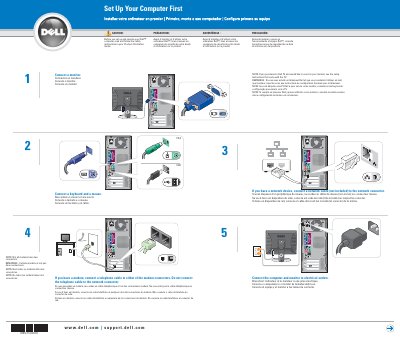

Dell Computer Setup Guide - cover page
Brand
DELL
Category
Desktops
Document type
Installation Guide
Language
English
Pages
2
File format
PDF
File size
452 KB
Published
20 November, 2023
Updated
20 November, 2023
MD5 checksum
F3AFC76070313BD814BE70AC691D24F6

About this manual

This guide explains the first steps for setting up a Dell computer, including connecting a monitor, keyboard, and mouse, connecting the computer and monitor to electrical outlets, and connecting modem or network cables.

It also covers setting up other devices last, such as speakers when integrated sound connectors are capped, and points to the Owner's Manual and Dell Support for additional instructions and help.

What's inside

  • Connect a monitor
  • Connect a keyboard and a mouse
  • Connect the computer and monitor to electrical outlets
  • Connect modem and network cables
  • Set Up Other Devices Last
  • Turn on the computer and monitor
  • Help and Support

Frequently asked questions

Where can I find additional setup instructions, including how to connect a printer?

See your Owner's Manual.

Where are support and educational tools available?

They are available on the Dell Support website at support.dell.com.

What should I do if the integrated sound connectors are covered by a cap?

Connect your speakers to the optional sound-card connectors and do not remove the cap.

Should the telephone cable be connected to the network connector?

No; connect it to a modem connector and do not connect it to the network connector.

Download PDF (452 KB)

More DELL Manuals


View all DELL manuals →