
Dell Inspiron 5000 Series Notebook Quick Start Guide
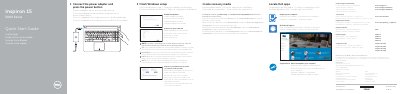
This quick start guide covers initial setup for Dell Inspiron 15 5000 Series notebooks (regulatory model P51F), including connecting the power adapter, completing Windows setup, enabling Dell updates, connecting to a network, locating Dell apps, and creating recovery media.
It also identifies external features and ports, lists keyboard shortcut keys, and provides product support, regulatory, safety, and electrical-rating information.
| Input voltage | 100 V AC-240 V AC |
|---|---|
| Input frequency | 50 Hz-60 Hz |
| Input current | 1.50 A/1.60 A/1.70 A |
| Output voltage | 19.50 V DC |
| Output current | 2.31 A/3.34 A |
| Country of origin | China |
In Windows search, type Recovery, click Create a recovery media, and follow the instructions on the screen.
Product support and manuals are available at Dell.com/support and Dell.com/support/manuals.
The guide lists shortcut keys for audio mute and volume, brightness, external display, wireless toggle, sleep, Fn-key lock, keyboard backlight, and media playback.