
Dell Printer Installation Guide

This document describes how to install and use a Dell printer.
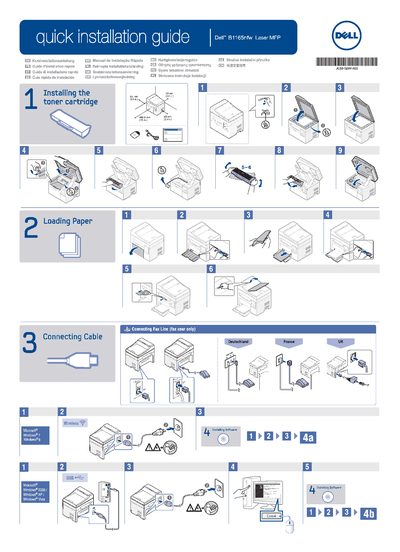

Dell Printer Installation Guide - cover page
Brand
DELL
Category
Printer
Document type
Installation Guide
Language
English
Pages
2
File format
PDF
File size
5.6 MB
Published
19 November, 2023
Updated
19 November, 2023
MD5 checksum
07DC3DEA33C480E042A07A714AFEB85D

About this manual

This document provides a quick installation guide for Dell printers. It covers essential setup steps including installing the toner cartridge, loading paper, and connecting the device via cable or fax line. The guide includes instructions for connecting to Microsoft Windows 2000, XP, and Vista.

What's inside

  • Installing the toner cartridge
  • Loading Paper
  • Connecting Fax Line
  • Installing Software
  • Select a Connection Method
  • Viewing the User's Guide

Frequently asked questions

What is the first installation step listed in the guide?

The first step is installing the toner cartridge.

Who needs to connect the fax line?

Only fax users need to connect the fax line.

Which Windows versions are listed for the printer setup?

The guide lists Windows 2000, Windows XP, and Windows Vista.

What should you read before using the product?

You should read the safety guidelines in the Product Information Guide.

Download PDF (5.6 MB)

More DELL Manuals


View all DELL manuals →