
Dell Precision 7510 Mobile Workstation 7000 Series Quick Start Guide

Dell Precision Mobile Workstation 7000 Series Quick Start Guide
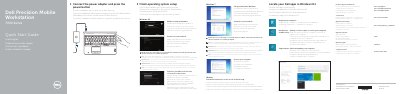

Dell Precision 7510 Mobile Workstation 7000 Series Quick Start Guide - cover page
Brand
DELL
Category
Laptops
Document type
Quick Start Guide
Language
MUL
Pages
2
File format
PDF
File size
1.1 MB
Published
19 November, 2023
Updated
19 November, 2023
MD5 checksum
654DBB00A852650C47F99A386246ADB4

About this manual

This quick start guide covers initial setup of a Dell Precision 7510 mobile workstation, including connecting the power adapter, completing operating system setup, enabling security and updates, connecting to a network, and signing in.

It also identifies workstation features and ports, and directs users to Dell support, manuals, regulatory information, and backup and recovery resources.

What's inside

  • Connect the power adapter and press the power button
  • Finish operating system setup
  • Enable security and updates
  • Connect to your network
  • Sign in to your Microsoft account or create a local account
  • Locate your Dell apps in Windows 8.1
  • Features
  • Product support and manuals
  • Regulatory and safety

Specifications

Computer modelDell Precision 7510
Regulatory modelP53F
Regulatory typeP53F001
USB-C connectorOptional
Fingerprint readerOptional

Frequently asked questions

Where can I find the owner's manual?

See the Owner's Manual at dell.com/support/manuals.

What is the computer model?

The computer model is Dell Precision 7510.

Download PDF (1.1 MB)

More DELL Manuals


View all DELL manuals →