
This document is a quick start user guide for DSC 29010131 Security | Access | Video | Intrusion | Converged Solutions | Services.
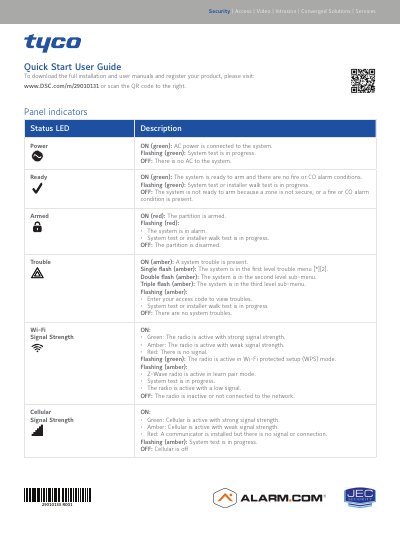
This document serves as a quick start guide for the DSC 29010131 security system. It provides instructions on interpreting the status LED indicators for power, readiness, arming, trouble, and signal strength for Wi-Fi, cellular, and remote connections. The guide also details how to arm and disarm the system using the integrated keypad and explains the function of the emergency keys for fire, auxiliary, and panic alarms.
| Operating Frequency Band 433.04 MHz – 434.79 MHz | 10 mW |
|---|---|
| Operating Frequency Band 868.0 MHz – 868.6 MHz | 10 mW |
| Operating Frequency Band 2400 MHz – 2483.5 MHz | 100 mW |
| Operating Frequency Band E-GSM 900 | 2 W |
| Operating Frequency Band DCS 1800 | 1 W |
The Ready LED is ON (green) when the system is ready to arm and there are no fire or CO alarm conditions.
Tap any key to silence the beeps, or enter your access code if the Trouble LED is flashing.
The Fire key activates the siren in the pulsed fire pattern when held for 2 seconds.